Just when we thought that BlackBerry was
dead and gone, or perhaps on its last breath, the BlackBerry Corporation
(formerly known as Research In Motion) released a new series of
handsets at the beginning of the year with the latest version of their
OS the BlackBerry 10 OS. As soon as the set was released the initial
worldwide reception was enough to get just about any BlackBerry critic
to admit the comeback.
So BlackBerry sets are being seen sported
around again which consequently means that the company’s legendary
BlackBerry Messenger service is kicking and roaring back into action.
The service is an in platform messaging software which allows
individuals who use the BlackBerry platform to communicate with each
other through messages without incurring any extra data plan or package
fee. If someone close to you owns a BlackBerry then you will be only too
familiar with this service and might also get the itch to read the
messages that are being exchanged. Whether you are a concerned parent or
suspicious spouse, to know what’s happening in their life, you must
know how to access their BBM messages. Here is how to go about it.
1. Look For BBM Spy Software:
In order to get into their BBM messages, you will need the help of
specially designed software that can retrieve the desired data. However,
there is a dearth of good programs that will specifically target the
messaging service. Many apps will allow you to access phone
conversations or call logs but not the actual messages exchanged in BBM
chat. So when looking for software to use, make sure it specifies itself
as a Blackberry Spy app.
2. Evaluate the Options:
Once you find software that can access BBM messages, pick one that
suits your needs the best. If you are unable to figure out any at all,
then there is one of my favorite apps for starters that you can try. mSpy
is a good option that solves many problems when it comes to spying.
With this one you can access BBM conversations, emails, texts and even
ongoing phone calls. Additional features of mSpy include recording
videos, photos, YouTube activity, iMessages, contacts, phone call info
and much more. but not live calls. This app will allow the user to
monitor the target BlackBerry remotely. With mSpy you can access the
recorded data from an online dashboard from any web browser across the
globe. Download mSpy from the link below:
Compatible Phones: Android, BlackBerry, Apple iPhone, Windows Mobile, iPod and Tablets.
3. Download and Install:
Once you have decided on BBM spy software, you need to purchase it. In
order for it to work it needs to be accessed from the target’s phone.
That means you must physically retrieve the BlackBerry you wish to
monitor and access the Internet. Stealth would be required on your side
of course. After that you proceed to downloading it from the source
site. Once download is complete, begin the installation process. Once
the notification of installation completion appears, you can be sure
that the spy software is successfully in place. Simply wait for
conversations to take place and then monitor them!
DISCLAIMER:
YOU IMPLEMENT ALL THE INFORMATION PROVIDED IN THIS ARTICLE AT YOUR OWN
RISK. USAGE OF SPYWARE WITHOUT PRIOR USER CONSENT MAY BE AGAINST YOUR
LOCAL LAWS AND YOU DO IT AT YOUR OWN RISK!
Most of us are very curious to know a method to send spoofed emails
to our friends and family for fun. But the question is, is it possible
to send spoofed emails in spite of the advanced spam
filtering technology adopted by email service provides like Gmail, Yahoo
etc?
The answer is YES, it is still possible to bypass their spam filters and send spoofed emails anonymously to your friends or family members. For example, you can send an email to your friend with the following sender details.
From: Bill Gates <billg@microsoft.com>
The art of sending this kind of email is known as Email Spoofing.
One of the easy way to send a spoofed email is by using our own local
SMTP server. In the past, I have tried SMTP servers like QK SMTP server.
This method used to work successfully in those days, but as of now,
it has a very low success rate since Gmail and Yahoo (all major email
service providers) blocks the emails that are sent directly from a home
computer.
How to Send Spoofed Emails?
In this post, I have come up with a new
method of sending spoofed emails to anyone without having to worry about
being blocked or filtered as spam. In order to accomplish this, all
you’ve to do is use a “relay server” while sending the spoofed emails.
What is a Relay Server?
In simple words, a relay server is an SMTP Server that
is trusted by major companies as an authorized sender of the email. So,
when you send an email using a relay server, the email service
providers like Yahoo and Gmail blindly accept the emails and deliver it
to the inbox of the recipient. If the SMTP server is not authorized,
Google and Yahoo will reject all the emails sent from this SMTP server.
This is the reason for which using our own SMTP server to send emails fail.
So, How to Find a Relay Server?
Now, all we have to do is find a trusted SMTP server
so as to send spoofed emails successfully. Usually, all the emails that
are sent from web hosting providers are trusted and authorized. So, you
have to find a free web hosting provider that allows you to send
emails. But, most of the free web hosts disable the Mail feature and do
not allow the users to send emails. This is done just to avoid spamming.
However, all the paid hosting plans allow you to send any number of
emails. Once you find a hosting service that allows to send emails from
their servers, it’s just a cakewalk to send anonymous emails. All we
have to do is just modify the email header to insert a fakeFrom: address field into it.
I have created a PHP script that allows
you to send emails from any name and email address of your choice. Here
is a step-by-step procedure to setup your own anonymous email sender
script:
With
Gmail being one of the most widely used email services across the
globe, it has also become a favorite place for many to engage in secret
relationships and exchange cheating messages.
Therefore, in order to reveal the secret, it becomes inevitable for people to hack the Gmail password of their loved ones.
Possible Ways to Hack Gmail Password
Today, most websites on the Internet
give out false or outdated password hacking methods that completely
mislead the readers. I have also seen a few top ranking websites making
false promises to hack any Gmail password and urge users to take-up
surveys. Remember, this is just a honeypot setup by the website owner
only to earn money where no Gmail password will be delivered to users
upon survey completion. However, on this website we strive hard to
present readers with true and accurate information that actually work.
With many years of my experience in the field of information security, I
can tell you that the following are the only two ways to hack Gmail
password.
1. Keylogging: Easiest Way to Hack Gmail Password
Keylogging is by far the easiest way to
gain access to any Gmail account. Keylogging involves the use of a small
software program called the keylogger. This keylogger when installed on
a given computer will capture each and every keystroke typed on the
keyboard including all types of passwords.
Does a Keylogger Require Any Special Knowledge?
No, absolutely not! Keyloggers are
designed in such a way that even the first time users also find it easy
to install and control. Anyone with a basic knowledge of computer can
use it with ease to gamil access to any Gmail account.
Is it Possible to Detect a Keylogger?
Right after the installation process is
completed, the keylogger goes completely hidden and continues to work in
the background. Hence, it is impossible for the users of the computer
to know about its presence.
What if I do not have Physical Access to the Target Computer?
Well, you need not worry as I am going
to suggest one of the best keylogger program that supports installation
on a local computer as well as a remote computer. I recommend the following keylogger as the best to gain access to Gmail account:
Top Features of Realtime-Spy:
REMOTE AND LOCAL INSTALLATION
The product supports installation on remote as well as a local computer.
EXTREMELY EASY TO INSTALL
Realtime-Spy is very small in size and can be installed with just a click of a button.
NEVER GET CAUGHT!
This product runs in a total stealth mode so that you need not worry about being caught or traced back.
ACCESS ANY PASSWORD!
This product can be used to hack Gmail or any other online password.
WORKS ON WINDOWS AND MAC
Fully compatible with Windows XP/Vista/7/8 (32 and 64-bit) and Mac.
You get a detailed step-by-step
instruction and technical support after your purchase. So, go grab
Realtime-Spy now and expose the truth!
To gain access to Gmail account accessed
from cell phones or mobile devices, there is a mobile version of the
same program called mSpy which you can download from the following link:
Supported Devices: Android, Windows Mobile, BlackBerry, iPhone, Apple iPads and Android tablets.
2. Phishing: Difficult Way (for advanced users only)
Phishing is a way to capture sensitive
information such as usernames, passwords and credit card
details. Phishing usually involves the use of a spoofed Gmail page (or a
fake Gmail website) whose look and feel is almost identical to that of
the legitimate websites Gmail website. When the users try to login from
this fake Gmail page and enter their password there, the login details
are stolen away by the hacker.
However, creating a fake login page for
Gmail and taking it online to successfully hack the password is not an
easy job. It demands an in depth technical knowledge of HTML and
scripting languages like PHP, JSP etc. In addition to that, carrying out
a phishing attack is a serious criminal offence. So, if you are new to
the concept of hacking passwords, then I only recommend using the
keyloggers as they are the easiest the safest way to hack Gmail or any
online password.
DISCLAIMER:
YOU IMPLEMENT ALL THE INFORMATION PROVIDED IN THIS ARTICLE AT YOUR OWN
RISK. USAGE OF SPYWARE WITHOUT PRIOR USER CONSENT MAY BE AGAINST YOUR
LOCAL LAWS AND YOU DO IT AT YOUR OWN RISK!
Every
day, a lot of people contact me about suspecting their boyfriend or
girlfriend of cheating and ask me about ways to hack their Yahoo
password, so that they can investigate the truth about their partners. this trick is provided by deeputricks.blogspot.com
If you are in a similar situation or just wondering to know how to hack a Yahoo password, this post can surely help you out.
Is it Possible to Hack Yahoo Password?
Yes, as a matter of fact it is possible
to hack almost any password including that of Yahoo and any other online
accounts, I can tell you that the following are the only FOOLPROOF TECHNIQUES to hack Yahoo password:
1. Keylogging: Easiest Way to Hack Yahoo Password
Using a keylogger is the easiest way to
hack Yahoo and other online account passwords. A keylogger is a small
program that runs in a hidden mode and captures each and every keystroke
(including passwords) that a user types on the computer’s keyboard.
This makes it possible for one to easily hack the password of any Yahoo
account.
The special thing about keylogger is
that anyone with a basic knowledge of computer should be able to install
and use it. With my experience, I recommend the following keylogger as
the best for your password hacking needs:
Key Features of Realtime-Spy:
REMAINS UNDETECTED!
After installation, Realtime-Spy
operates in a total stealth mode to capture the password of target Yahoo
user. This makes it that makes it impossible to detect its presence.
Hence, you can relax and stop worrying about being traced back.
REMOTE INSTALLATION!
In addition to installation on a local
computer, this program also support remote installation. That means, you
can install it even on those computers for which you do not have
physical access and record Yahoo activity on it.
ACCESS LOGS ONLINE!
Once installed on the target computer,
Realtime-Spy captures all the keystrokes (including passwords of Yahoo
and other online accounts) and the logs are continuously uploaded to the
Realtime-Spy servers. You can access the logs on your web browser from
any place at any time to obtain the password of target Yahoo user.
SUPPORTS BOTH WINDOWS AND MAC
Realtime-Spy is fully compatible with Windows XP/Vista/7/8 (32 and 64-bit) and Mac.
FAQs About Realtime-Spy:
I don’t have physical access to the target computer, what can I do?
You need not worry! As Realtime-Spy offers Remote Installation Feature,
it is possible to remotely install it on the target computer (on which
target Yahoo user is likely to access his/her Yahoo account) even if you
do not have physical access to it. However, local installation is also
supported.
Does Realtime-Spy collect any personal information from me?
Realtime-Spy does not collect any personal information from its users. Your privacy is totally guaranteed!
Is Realtime-Spy trustworthy?
Realtime-Spy is backed by thousands of
trusted users across the world over the last ten years. It is a software
program developed by Spytech Software and Design, Inc. which is one of
the reputed company in United States.
What are the other features of Realtime-Spy software?
With Realtime-Spy, you can gain access to any password protected account including Yahoo, Gmail, Hotmail, Facebook etc.
This software will not only capture passwords (Yahoo, Gmail etc.), but will also take screenshots and record chat conversations.
If the target user is likely to access
his/her Yahoo account from a mobile device, you will have to go for the
mobile version of the above program called mSpy:
Supported Phones: Android, BlackBerry, iPhone, Windows Mobile, Apple iPads and Android tablets!
2. Other Ways To Hack Yahoo Password
The other most commonly used trick to hack Yahoo password is by using a fake login Page (also called as Phishing).
Today, phishing is the most widely used technique to hack Yahoo
password. A fake login page is a page that resembles the login pages of
sites like Yahoo, Gmail, Facebook etc. The victim is tricked to believe
this fake Yahoo login page to be the real one. But once the user
enters the password there, the login details of his/her Yahoo account
end up falling in the hands of the hacker.
Phishing can be very effective when
implemented successfully. But creating a fake login page for websites
like Yahoo and taking it online to make the hack attempt successful is
not an easy job. It demands an in depth technical knowledge of HTML and
scripting languages like PHP and PERL.
Carrying out a phishing attack is a
criminal offense and if caught one can be behind the bars! So, if you
are a novice computer user with a very basic knowledge, I recommend the
use of keyloggers as the best way to hack Yahoo password.
None of the Yahoo hacking methods other
than those mentioned above are known to work successfully. So, if you
come across any other method it should either be an obsolete one or just
a scam. Some sites are also found to be making false promises that they
can give access to any Yahoo account for which the users will have to
take up a few surveys. In a hope of getting the Yahoo password users
complete the surveys but no password is offered to them upon completion.
So, beware of those fake Yahoo hacking sites and do not waste your time
on them.
DISCLAIMER:
YOU IMPLEMENT ALL THE INFORMATION PROVIDED IN THIS ARTICLE AT YOUR OWN
RISK. USAGE OF SPYWARE WITHOUT PRIOR USER CONSENT MAY BE AGAINST YOUR
LOCAL LAWS AND YOU DO IT AT YOUR OWN RISK!
hello friends , in this post i am going to introduce you a free new sms trick for airtel users. By this trick you can send free sms to all operators for free. this trick is 100% working allover India.deeputricks is always here to help you IF you are
searching for free unlimited sms trick , then you are now at right
place.Go forward. and enjoy free airtel sms trick 2015.
Read how to send free sms to all operators using your airtel sim
1. Write #freesmsmob nour msg and then send it to 55444 e.g #freesms 12345 Hi Guys this is techintor to 55444 2. maintain balance zero 3. You are done
if this trick is helpful, then please share it. Any doubts then Comment here.
Hello friends, a
happy news for all web site developers . that is zoho.in offers free
.co.in or .in domain and also create free website. there is no any
trick. By registering domain you will get free zoho mail and zoho docs.
Just follow the
below steps and grab your .in or .co.in domain and create free website
with zoho.in. I am not describing more, let's go to the steps.
Steps ( how to register .IN or .CO.IN domain and create a free site in zoho.in)
1. Go to HERE 2. Search a domain, If available , then continue to registration 3. Register with your details 4. now you will receive a confirmation link on given mail address 5. Now you will get token number , and verify it 6. You are done. 7. Build your free website with free .in or .co.in domain.
Note
One domain is avialable for one user
If this post helped you? then don't forget to share it. sharing is caring
Sometimes all you need is a good idea. This is more so if you happen
to be a blogger. A lot of bloggers have enough time on their hands to
blog everyday yet they seem to be lacking ideas. If you are facing a
dearth of ideas for blog posts, you are certainly not alone. For
bloggers who want to write good quality content that is interesting, a
dearth of blog post ideas is something they have to deal with often. But don’t worry. There are ways in which you can find unique blog post ideas for your blog. Here’s how.
Forums
are a great place to pick out new ideas for your blog. Lots of people
log into popular forums everyday to express their thoughts, ideas and
opinions. Visit such forums that are related to the niche your blog
deals with and see what people are interested about and are talking on.
This will give you some pretty good ideas about topics to write about.
For example, if your blog is about parenting, visit forums which have
lots of moms and dads coming in and find out what interests them.
Social bookmarking
sites are another place where you can get unique idea of what to write
on your blog. Sites like Digg and StumbleUpon have articles on their
home pages which indicate that those are the topics people searched on
recently. This will give you a good idea of what to write on the niche
you are interested in.
The blog comment section
of other blogs is a wonderful place to go visit for unique new ideas.
Yes, that’s right. Visit blogs which are related to the topic your blog
is about and find out what people are commenting and discussing in the
comments section. Often, you will find ideas that are fantastic and
worth writing about.
You can also go to related blogs for ideas
for posts. Go to the archive section of the blog and find out what is
being written about. That does not however mean that you copy ideas and
stuff. The idea is more about finding topics that interest you and
something that you wish to write about.
New sites are a
wonderful place to get unique ideas for your blog. Good news sites like
the ones by Yahoo and Google are places where the latest and most
happening news from all around the globe are reported. You can easily
find lots of things to write about, especially if your blog deals with
current affairs.
There are quite a few popular ‘questions and answers’
websites on the internet. Yahoo Answers, Wiki Answers and Google
Answers are just a few of them. Here people come in to put up their
questions and want answers. They are great for finding new ideas for
blog posts.
Interview someone you admire. It could be a fellow
blogger, a person you admire or your aunt. Only thing, the interview has
to be interesting and worthy of reading.
Page
Rank is calculated by various algorithms made by search engines, in
simple words, Page Rank is calculated upon the number of links on your
site; these links Include:
Backlinks.
Inbound links.
Internal links.
External links.
No-Follow links.
Do-Follow links.
Google
and other Page Ranking sites analyze these links and assign a numerical
page rank from 1 to 10 to your website. Below we will discuss Top 15
Killer Tips To Increase Page Rank
How To Increase Page Rank?
1. High Quality Content:
In
order to increase Page Rank you must have unique quality content which
your readers want to share with their friends.
2. Site Submitting:
To
boost Page Rank you must have high quality Backlinks and the best way
to generate quality backlinks is to submit your site on different web
directories and article directories.
Some Good Web And Article Directories Are:
DMOZ
Yahoo Directory
Best Of The Web
Ezine Articles
Article Base
Go Articles
3. Guest Posting:
This
is one of the most used and best technique to increase Page Rank. Most
Blogs have options of guest posting through which you can post at their
blog and get two or three backlinks in return to your blog this really
helps if you are posting on good Page Rank Blog with the same Niche as
yours.
4. Link Exchange:
This is one of the most old
techniques but it still works, in order to get a good PageRank you
should get higher Page Rank sites to link to your site, through this you
will firstly get a good Page Rank and will get traffic from that site.
5. Keep Updating:
Google
really likes Sites that keep their content fresh and unique. The more
you post, the more Google will crawl your site and the more chances for
you to increase page rank
6. Commenting On Other Blogs:
Commenting
is a very crucial process in generating a good Page Rank. In Blogging
Community you must be very socially active. Some Blogs are Do-Follow,
which can help you generate back links to your site by just commenting
on their posts. Nowadays most blogs have Comment Luv Plugin installed on their site which automatically places a link to their last blog post at the end of their comment.
7. Social Bookmarking:
Social
Bookmarking is a very effective method to increase Page Rank because by
sharing your Site on different Social Sites you will get a free
Backlink and Traffic. Some of the most popular Social Bookmarking Sites
Are:
Facebook
Google Plus
Squidoo
Digg
Hub Pages
Stumble Upon
8. Website Accessibility:
If
Your Website is down for a long period of time, Google may reduce the
ranking of your site. So You should always keep Your Website accessible.
9. Using Commonly Searched Keywords:
As
You know people search using keywords and not the whole sentence so if
you have used a keyword which is very frequently searched then you get a
higher chance of your website being visited and MORE VISITORS = BETTER
PAGE RANK.
10. Website Advertising:
You can make an Ad or a
banner for your site and advertise it on different website, through
this you will get good back links and traffic.
11. Create Multiple Pages:
If You create multiple Pages on Your Site this will strengthen your internal linking and will ultimately increase Page Rank.
12. Participate In Forums:
Google
loves forums that are most frequently updated and by getting a back
link from these forums you will succeed on increasing Page Rank.
13. Using Signatures:
You
can add a link to your website in your online signatures. For example,
you can add signatures in your email and forum posts but don’t try to
spam because you can be blocked.
14. When Does Google Re-Evaluate Page Rank?
Google
Re-Evaluates Page Rank about Three to Four times per year, so almost
every Three months Google calculates Your Page Rank again.
15. Never Use Illegal Tactics:
Using
illegal tactics can get you banned from Google and Google is very smart
so never think that you can deceive Google because if they find out
that you are using illegal techniques which are against their policy
they will block you. Stay away from those tactics using these legitimate
techniques will improve traffic.
To a lot of people blogging is deemed as “difficult” to create a profitable blog and making money from it seems next to impossible. I believe making money blogging
is very easy and this is the mindset I approach my blogging ventures
with and is also the same mindset you should have. The basic components
of a creating a profitable blog blog are simple if you get everything
right from the start. The only challenge is the execution of making
money online. A lot of people have high aspirations of making money
online but what most of them seem to be lacking is the right mindset,
patience, dedication and perseverance.
Blogs have become one of
the most popular past times in our day and age today, and it almost
seems like everyone on the web is looking to start a blog.
When the idea of the weblog was first created in 1997, the idea of
making money had not even been a factor but now it seems that everyone
is writing about something they love and making money from it.
So
how do they do it? Well, having extensively studied many successful
blogs online, I have compiled a list 5 basic but very important
components that will factor in whether you are successful online and if
you take the basics of the top bloggers and apply them into your own
blogging, then you too can make a profitable blog in less time. Below
are 5 Basic Pillars of Creating Successful and Profitable Blog..
Read: 10 Killer Tips For New Bloggers Before Starting A Blog
How To Create Profitable and Successful Blog?
1. Find a Broader Niche
This
is most common rookie error when it comes to blogging. A lot of new
start ups online fail to realize that they should not try to dominate
the big niches and instead carve out smaller niches. The best way I can
explain this is by giving an example of who is in my opinion the best
blogger out there, Brian Clark.
Copyblogger is another blog that
educates others about making money online but focuses strictly on
copywriting and content. I had not seen any others doing this, so what
he did was in essence carve out a niche for himself and that is what you
have to think about doing.
My mentor Matt Bacak told me that if
you want to be incredibly wealthy, you have to create and control
markets. Find out where your passions and hobbies lie, and try to first
recognize the bigger niche you can place your foot in. Once you have
established this, find out where you can specifically specialize in and
form your blog around that. This is how you create and control markets.
2. Find Out If Your Niche Is Profitable
Now
the step above is very important point in Making a blog Successful and
Profitable Blog, but this point is equally as important. When you are
carving out a niche for yourself, you have to be smart about it.
Lets
say you were thinking about entering the broad niche of health and
fitness and knew a lot about swimming. This is good, and there are many
blogs out there that talk about swimming in general but, if you decided
that you wanted to teach people how to swim in the ocean and learn how
to do deep diving and things like that, this may be great for some
people, but would not be in the general interest of others.
Specializing
in something like the Swimmers Diet and obtaining the swimmers body
would be a better approach. This is something that only you can figure
with a little research and common sense.
3. Finding the Right Keywords
Anything
can fit under the category of keywords. Your blog url. The titles of
your articles. Your header tags. Meta description tags and anything
else. SEO
is a very crucial step in making money online and if you take the time
to learn how to do effective keyword research from the start, you can
really make your marketing and online awareness a whole lot simpler.
There
are 2 ways to go about keyword research, and these are 2 things I do to
find out which keywords I have a chance at ranking highly for in the
shortest space of time.
1.Find Specific Long Tail Keywords– What keywords do you think someone might type when searching for your
site in Google? How specific are they and how obvious are they?
Specific long tail keywords are a great way to start your keyword
research. Write down a long list of keywords that can be possible
candidates for your title tags, header tags and article titles.
2. Determine Competitiveness of Each Keywords– So once you have your list of keyword phrases, it is time to see how
relevant they are. Start by going to the Google Adwords Keywords Tool
and typing in your keywords.
What we are looking for is a high global monthly search number. Anything with 10000+ is great.
Then
what you want to do is do an “allintitle” search for your specific
keyword. This is to see how much competition you have. In order to do
this, just go to the Google and type in your keyword like this:
allintitle:keyword here
What
this command does is it tells Google to tell you how many pages on
Google have the keyword in the title tag. With this you want to aim for a
number below 3000.
Once you have found a list of keywords with a
high global monthly search and low all in title number, then you have a
winner. This will surely help you in Creating Successful and Profitable
Blog.
4. Get Your Blog Set Up
Once
you have your keywords and your niche, it is time to create a blog.
Creating a blog is very easy. Here are few things that you need. You can
choose blogger or wordpress hosting. But I would recommend you selfhost
wordpress blog. For wordpress hosting Hostgator is current the best web hosting provider. They have excellent support and features.
Make your blog as best you can
Don’t
forget that a blog is basically a reflection of your expertise so it
should reflect that of your brand. Look at how other people in your
niche have set up their blogs and if the layout feels right to you, you
can emulate some of their strategies and layouts in your own blog.
Don’t
forget that “beauty is in the eye of the beholder”, so if someone else
doesn’t like the look of your blog, it does not mean you should try
changing to best suit their needs. Make it easily navigable, with colors
that do not contrast too greatly and make your blogs purpose clearly
visible!
5. Begin Creating Content !
This
is when everything takes off! The purpose of a blog is provide your
specialty and expertise to your reader. In essence, your information
should solve the problem of the reader and upon reading your content,
they should feel as if they have learnt something very valuable.
When
you write content with confidence, people begin to respect you as an
author and blogger and thus your credibility and authority in your
“specific niche” goes up.
Make sure that your writing is
educational, unique and mind blowing. I have found that telling success
stories of yourself and/or others while giving tips is the best way to
go. People feed off the success of others, and when they read about it,
it makes them feel compelled to do the same. Adding in a quote here and
there is also a great way to provoke a thought, I mean lets face it, who
doesn’t love a clever quote?
So,
here are the 5 Basic Pillars of Creating Successful and Profitable
Blog. These things are just the “icing on the cake” and the real success
will come when you really get your blog into 5th gear and keep
experimenting and implementing new techniques.
All I can say for
now is master the basics and when all the fundamentals are in place, you
can begin to look at more advanced techniques. The basics are always
the most important factors and once you get them in place just keep
going and you will see result!
Don’t forget to share your views about “How to create a Successful and Profitable Blog easily” in comments. Happy Blogging.
Though
there are many ways to Get Traffic to A New Blog, the most important
factor is NETWORK. The more network you have the more traffic you’ll
get.
The best way to build a network around your blog is: start interacting with others using
Facebook
Twitter
Why
I’m mentioning only these two sites because, it’s easy to spread your
word and follow other bloggers easily using this social media sites
and Get Traffic to A New Blog.
How to Get Traffic to A New Blog ??
Following are some EXCEPTIONAL ways to bring traffic to a new blog (0r) any blog.
1. Blog Comments:
Comment on top blogs in your niche try to be the first 5 commenters.
Tips: Subscribe to their RSS feeds.
Don’t spam their blogs by writing one liners. Add value to your comments.
If you want to get traffic daily this is the best way to go.
Type “your niche + blog” in google to know which are the top blogs in your niche.
Ex: “blogging + blog”
2. Network with others using Facebook and twitter
Facebook: Join
in Groups.. Promote yourself out there.. BTW facebook alone is giving
me 100+ leads daily (even without promoting everyday!). Ammar Ali is
also getting huge traffic from Facebook . So don’t neglect bringing Facebook traffic to your blog.
You
may find it difficult in the beginning but when you start promoting
others content and when you get to know each other on Facebook, it
becomes very easy!
Twitter: Follow
top bloggers in your niche and follow their followers. This is the
simple yet effective way of increasing your targeted twitter followers.
Once you have done this, you can tweet your new articles and ask your
followers to retweet it.
3. Video Marketing:
Create a 2 min.video and add your blog link at the starting
Submit them to YouTube, metacafe etc.
Tools to use: Use Screenr to create free videos
4. Spend time on writing detailed articles.
Never assume that you can bring quality traffic without much efforts.
You
need to differentiate yourself with others to become successful. It
takes time to create content, I agree but you shouldn’t spend whole time
creating only normal or average 600 words posts.
Spend time to create great content.
Write
detailed posts with 1000 or 1500+ words once in a while. If you’re not a
full time blogger like me, at least try to create detailed posts once
or twice a month.
So that you can grab others attention and you can show your blogging expertise to your readers.
It’s
really important for you to create killer articles regularly to survive
in blogosphere. This can bring your quality traffic from other sites or
search engines.
4. Don’t forget SEO
Most people say forget about SEO (Search Engine Optimization) when you’re just starting out. I think that’s the dumbest suggestion!
You need to focus on what keywords to use and how much keyword density you should maintain in your content to get search engine traffic to your blog.
It’s extremely important to bring organic (search engine) traffic to your blog. Because it’s free and highly effective!
Make
sure that you’re not keyword stuffing your content. It makes your
readers hard to digest what you’re saying in your articles.
And do
proper keyword analysis before you’re writing the articles. Then embed
them into your posts. If you’re a beginner then this is enough! Don’t go
beyond, you’ll better understand about SEO when you’re spending more
time on blogging.
Flash Transfer faster than Bluetooth. Swipe And Share App | Android Flash Transfer Apk For Andriod download
Flash Transfer faster than Bluetooth ,Swipe And Share
App ,Android Flash Transfer Apk ,Flash transfer apk,Flash transfer apk
download,Faster file transfer in Mobile phones,Swipe and share
Flash Transfer faster than Bluetooth
Swipe And Share App | Android Flash Transfer Apk For Andriod download.A
new application introduced in Android device for transferring files
from one mobile to another mobile with in seconds.This App is called
Swipe & Share(Swipe and Share) ,also known as Flash Transfer Apk.
In the world of Mobile, Flash transfer rocking instead of Infrared and
Bluetooth.No doubts most of us still using Bluetooth as a medium to
transfer files , song, video, app, games etc from one mobile to
another.But now swipe and share file transfer is more easy(fast) without
using data charges by connecting each others phone over Wi-Fi.
This app can be used to share files between Android device with
just one swipe of your finger.Transfer Music, Videos, Photo Between two
mobiles through File transfer within seconds.Flash Transfer launched in Micromax A35 Bolt
with 1 GHz processor,but Now you can get Swipe And Share Application
(Flash Transfer) in any Andriod Mob Phones.Download application
and Install the Flash Transfer app or Swipe and Share app by Micromax on
any android device
Follow these steps and enjoy fastest file Transfer
Whether
you're a grizzled Windows vet or a relative newcomer, you can always
use a trick or two for making things go faster. We've compiled our 26
favorite time-saving tips for Windows XP, Vista, and 7. Print out this
story and keep it on your desk, under your pillow, or anywhere else.
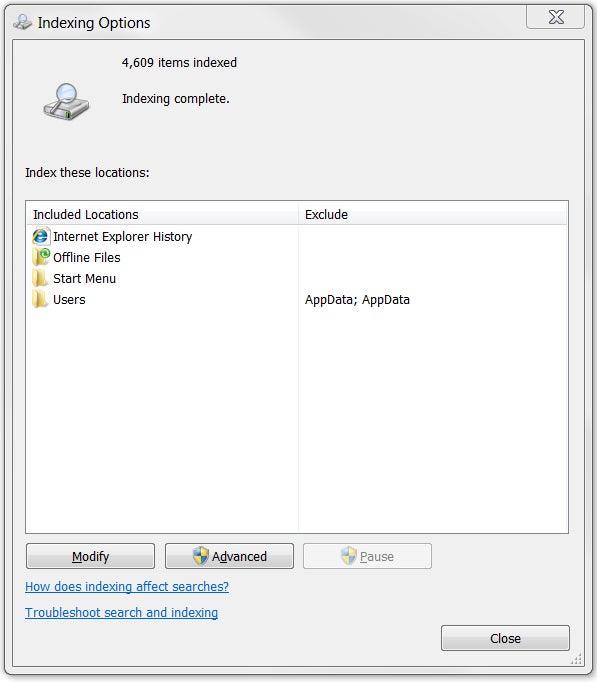
Manage the Task Manager: Windows' built-in Task Manager (press Ctrl-Alt-Del and click Task Manager) is great for seeing what your system is up to, but power users will prefer Process Explorer, which shows more details that can help you find a memory leak or troubleshoot a pesky DLL problem. Nudge your network: If you have network problems, try opening the command prompt (enter cmd in the Start menu's search box) and typing ipconfig /renew to reset your network connection. Index this, not that:
The Windows Search indexer speeds up built-in search functions, but the
indexing process itself can consume system resources at inconvenient
times. Open Indexing Options in Control Panel (or press the Windows key and type Indexing Options).
The resulting dialog box will let you specify which folders or types of
data are indexed to avoid bogging down your PC needlessly.
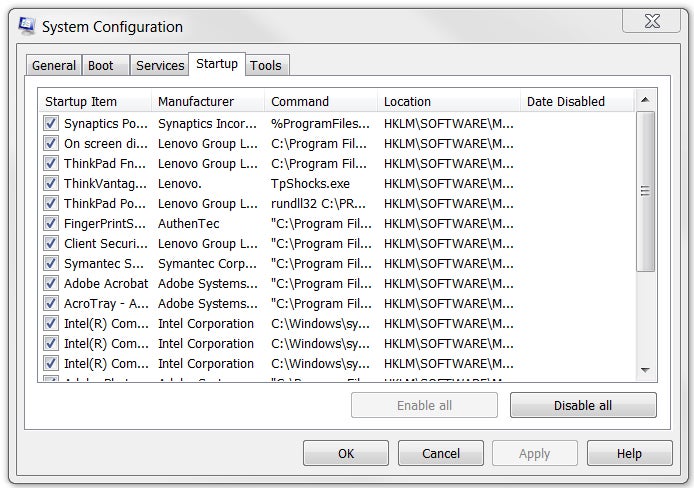
Clean up your startup: If your PC drags its feet during the startup process, press the Windows key and type msconfig
to open the System Configuration utility. Check in the Startup tab to
see what your machine is loading. Your computer might be loading
services or apps that you don't need or want to use on startup.
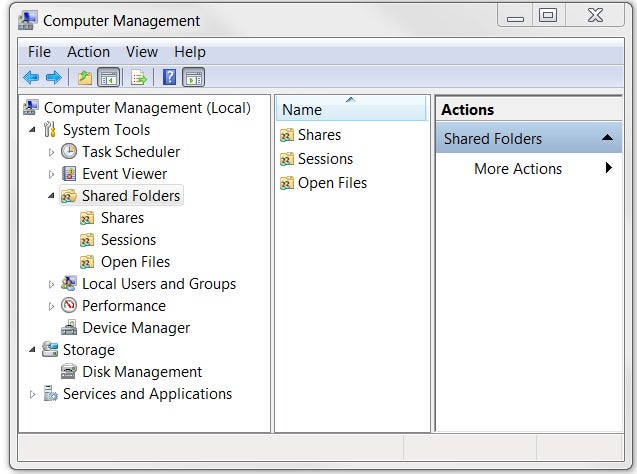
Sharing is caring: For a little assistance in tracking your shared folders, right-click My Computer (or Computer in Windows 7) and click Manage to bring up the Computer Management tool. Then click Shared Folders to see a list of all of your machine's shared folders, file-sharing sessions, and open files.
Essential Add-Ons
Look, Ma, no mouse: XP users should grab Launchy,
a free keyboard-driven launcher application that allows you to access
programs, files, and even Websites with just a few keystrokes. (Vista
and Windows 7 users get the same functionality from the Start menu's
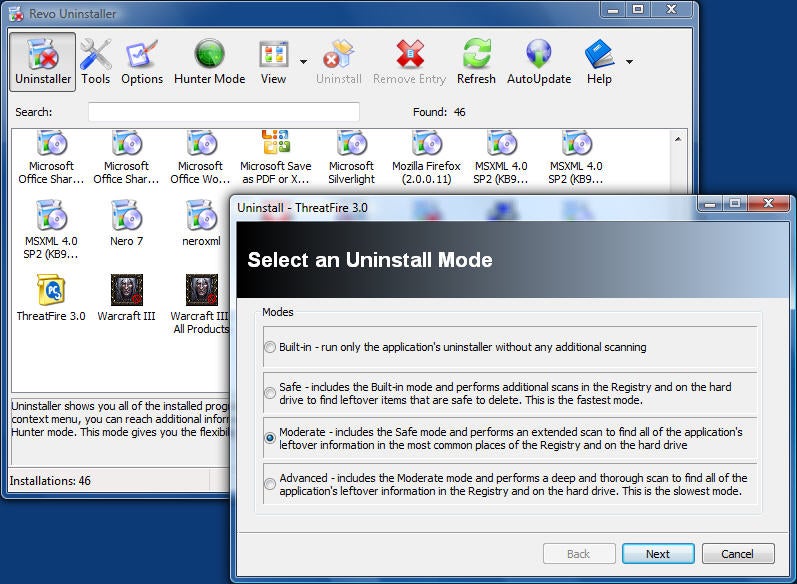
search tool.) Cleaner than you found it: To make sure that your programs uninstall completely, use Revo Uninstaller--it's often more thorough than the programs' own supplied uninstaller routines.
Annoyance buster: If you're tired of User Account
Control dialog boxes popping up all the time in Windows Vista, but you
don't want to disable the security feature completely, grab TweakUAC to set it to Quiet Mode. Windows 7 has its own UAC controls, but can still benefit from TweakUAC. Get your hands dirty with Greasemonkey: Optimize your Web browsing with Greasemonkey for Firefox, an add-on that lets you choose among thousands of user-designed scripts for blocking ads, changing the layouts of popular sites, and more. (Variants also exist for Internet Explorer, Chrome, and Safari.)
Work Your Windows Key
Lock your doors (and Windows): Stepping out for a minute? Remember to press Windows-L to lock your computer's screen so that no one can nose around without entering your account password.
Run, Windows, run: To access the Run command easily, press Windows-R. Keyboard explorer: Want to open a new Windows Explorer window without leaving the keyboard? Press Windows-E. Declutter your desktop: Access your desktop instantly by pressing Windows-D to hide all open windows. Press Windows-D again to return to where you were.
Here are our top 10 tips to help keep you and your
site safe online:
01. Keep software up to date
It may seem obvious, but ensuring you keep all software up to date is
vital in keeping your site secure. This applies to both the server
operating system and any software you may be running on your website
such as a CMS or forum. When website security holes are found in
software, hackers are quick to attempt to abuse them.
If you are using a managed hosting solution then you don't need to
worry so much about applying security updates for the operating system
as the hosting company should take care of this.
If you are using third-party software on your website such as a CMS
or forum, you should ensure you are quick to apply any security patches.
Most vendors have a mailing list or RSS feed detailing any website
security issues. WordPress, Umbraco and many other CMSes notify you of
available system updates when you log in.
02. SQL injection
SQL injection attacks are when an attacker uses a web form field or
URL parameter to gain access to or manipulate your database. When you
use standard Transact SQL it is easy to unknowingly insert rogue code
into your query that could be used to change tables, get information and
delete data. You can easily prevent this by always using parameterised
queries, most web languages have this feature and it is easy to
implement.
Consider this query:
"SELECT * FROM table WHERE column = '" + parameter + "';"
If an attacker changed the URL parameter to pass in ' or '1'='1 this will cause the query to look like this:
"SELECT * FROM table WHERE column = '' OR '1'='1';"
Since '1' is equal to '1' this will allow the attacker to add an
additional query to the end of the SQL statement which will also be
executed.
03. XSS
Cross site scripting is when an attacker tries to pass in JavaScript
or other scripting code into a web form to attempt to run malicious code
for visitors of your site. When creating a form always ensure you check
the data being submitted and encode or strip out any HTML.
04. Error messages
Be careful with how much information you give away in your error
messages. For example if you have a login form on your website you
should think about the language you use to communicate failure when
attempting logins. You should use generic messages like “Incorrect
username or password” as not to specify when a user got half of the
query right. If an attacker tries a brute force attack to get a username
and password and the error message gives away when one of the fields
are correct then the attacker knows he has one of the fields and can
concentrate on the other field. Keep your error messages vague
05. Server side validation/form validation
Validation should always be done both on the browser and server side.
The browser can catch simple failures like mandatory fields that are
empty and when you enter text into a numbers only field. These can
however be bypassed, and you should make sure you check for these
validation and deeper validation server side as failing to do so could
lead to malicious code or scripting code being inserted into the
database or could cause undesirable results in your website.
06. Passwords
Everyone knows they should use complex passwords, but that doesn’t
mean they always do. It is crucial to use strong passwords to your
server and website admin area, but equally also important to insist on
good password practices for your users to protect the security of their
accounts.
As much as users may not like it, enforcing password requirements
such as a minimum of around eight characters, including an uppercase
letter and number will help to protect their information in the long
run.
Passwords should always be stored as encrypted values, preferably
using a one way hashing algorithm such as SHA. Using this method means
when you are authenticating users you are only ever comparing encrypted
values. For extra website security it is a good idea to salt the
passwords, using a new salt per password.
In the event of someone hacking in and stealing your passwords, using
hashed passwords could help damage limitation, as decrypting them is
not possible. The best someone can do is a dictionary attack or brute
force attack, essentially guessing every combination until it finds a
match. When using salted passwords the process of cracking a large
number of passwords is even slower as every guess has to be hashed
separately for every salt + password which is computationally very
expensive.
Thankfully, many CMSes provide user management out of the box with a
lot of these website security features built in, although some
configuration or extra modules might be required to use salted passwords
(pre Drupal 7) or to set the minimum password strength. If you are
using .NET then it's worth using membership providers as they are very
configurable, provide inbuilt website security and include readymade
controls for login and password reset.
07. File uploads
Allowing users to upload files to your website can be a big website
security risk, even if it’s simply to change their avatar. The risk is
that any file uploaded however innocent it may look, could contain a
script that when executed on your server completely opens up your
website.
If you have a file upload form then you need to treat all files with
great suspicion. If you are allowing users to upload images, you cannot
rely on the file extension or the mime type to verify that the file is
an image as these can easily be faked. Even opening the file and reading
the header, or using functions to check the image size are not full
proof. Most images formats allow storing a comment section which could
contain PHP code that could be executed by the server.
So what can you do to prevent this? Ultimately you want to stop users
from being able to execute any file they upload. By default web servers
won't attempt to execute files with image extensions, but it isn't
recommended to rely solely on checking the file extension as a file with
the name image.jpg.php has been known to get through.
Some options are to rename the file on upload to ensure the correct
file extension, or to change the file permissions, for example, chmod
0666 so it can't be executed. If using *nix you could create a .htaccess
file (see below) that will only allow access to set files preventing
the double extension attack mentioned earlier.
    deny from all
    <Files ~ "^\w+\.(gif|jpe?g|png)$">
    order deny,allow
    allow from all
    </Files>
Ultimately, the recommended solution is to prevent direct access to
uploaded files all together. This way, any files uploaded to your
website are stored in a folder outside of the webroot or in the database
as a blob. If your files are not directly accessible you will need to
create a script to fetch the files from the private folder (or an HTTP
handler in .NET) and deliver them to the browser. Image tags support an
src attribute that is not a direct URL to an image, so your src
attribute can point to your file delivery script providing you set the
correct content type in the HTTP header. For example:
// Fetch image filename from database based on $_GET["id"]
...
// Deliver image to browser
Header('Content-Type: image/gif');
readfile('images/'.$fileName);
?>
Most hosting providers deal with the server configuration for you,
but if you are hosting your website on your own server then there are
few things you will want to check.
Ensure you have a firewall setup, and are blocking all non essential
ports. If possible setting up a DMZ (Demilitarised Zone) only allowing
access to port 80 and 443 from the outside world. Although this might
not be possible if you don't have access to your server from an internal
network as you would need to open up ports to allow uploading files and
to remotely log in to your server over SSH or RDP.
If you are allowing files to be uploaded from the Internet only use secure transport methods to your server such as SFTP or SSH.
If possible have your database running on a different server to that
of your web server. Doing this means the database server cannot be
accessed directly from the outside world, only your web server can
access it, minimising the risk of your data being exposed.
Finally, don't forget about restricting physical access to your server.
09.SSL
SSL is a protocol used to provide security over the Internet. It is a
good idea to use a security certificate whenever you are passing
personal information between the website and web server or database.
Attackers could sniff for this information and if the communication
medium is not secure could capture it and use this information to gain
access to user accounts and personal data. Use an SSL certificate
10. Website security tools
Once you think you have done all you can then it's time to test your
website security. The most effective way of doing this is via the use of
some website security tools, often referred to as penetration testing
or pen testing for short.
There are many commercial and free products to assist you with this.
They work on a similar basis to scripts hackers will use in that they
test all know exploits and attempt to compromise your site using some of
the previous mentioned methods such as SQL injection.
Some free tools that are worth looking at:
Netsparker (Free community edition and trial version available). Good for testing SQL injection and XSS
OpenVAS. Claims to be the most
advanced open source security scanner. Good for testing known
vulnerabilities, currently scans over 25,000. But it can be difficult to
setup and requires a OpenVAS server to be installed which only runs on
*nix. OpenVAS is fork of a Nessus before it became a closed-source commercial product.
The results from automated tests can be daunting, as they present a
wealth of potential issues. The important thing is to focus on the
critical issues first. Each issue reported normally comes with a good
explanation of the potential vulnerability. You will probably find that
some of the medium/low issues aren't a concern for your site.
If you wish to take things a step further then there are some further
steps you can take to manually try to compromise your site by altering
POST/GET values. A debugging proxy can assist you here as it allows you
to intercept the values of an HTTP request between your browser and the
server. A popular freeware application called Fiddler is a good starting point.
So what should you be trying to alter on the request? If you have
pages which should only be visible to a logged in user then I would try
changing URL parameters such as user id, or cookie values in an attempt
to view details of another user. Another area worth testing are forms,
changing the POST values to attempt to submit code to perform XSS or to
upload a server side script. Use a debugging proxy to root out vulnerabilities
Hopefully these tips will help keep your site and information safe.
Thankfully most CMSes have a lot of inbuilt website security features,
but it is a still a good idea to have knowledge of the most common
security exploits so you can ensure you are covered.
There are also some helpful modules available for CMSes to check your installation for common security flaws such as Security Review for Drupal and WP Security Scan for WordPress. For latest tricks and tips